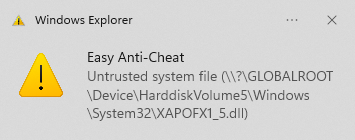
How to fix the Easy Anti-Cheat “Untrusted System File” error, specifically when it complains about XAPOFX1_5.dll (or similar files) and prevents your game from launching.
What causes this error?
Easy Anti-Cheat may block a file because:
The file is outdated
The file is corrupted
The file is located in the wrong system folder
A 32-bit file is placed where a 64-bit file should be
In this case, the problematic file is usually XAPOFX1_5.dll, which is part of Microsoft DirectX (audio FX library).
How to fix it (Step-by-step)
Locate the file
It may be inside the game folder or in:
C:\Windows\System32
Delete the file
You’ll need administrator permissions.
If the file is locked, close the game, Steam/Epic Games, or kill the process in Task Manager.
If needed, restart your PC and delete it before launching anything.
Reinstall the correct DirectX files
The game will likely fail to start after deletion — this is normal.
Do NOT download random DLLs from shady sites.
Instead, download the official Microsoft DirectX SDK (June 2010).
Even on Windows 10 / Windows 11, this still works perfectly.
Install properly
Extract the files into a separate folder (don’t use temp).
Run the installer.
After installation, refresh the System32 folder (F5).
Launch the game
Easy Anti-Cheat should stop complaining.
The game should now run normally.
Important Notes
System32 actually contains 64-bit files (yes, Windows logic).
SysWOW64 is for 32-bit files.
Tools like SFC /scannow or DISM usually won’t fix this, because DirectX SDK files are not part of core Windows.
This fix also works even if Easy Anti-Cheat is not involved and the game simply throws 0xc00007b errors.
Download Link
You can download the DirectX package directly from Microsoft